Friday, 20 January 2012

Jailbreak IPhone 4S / iPad 2 5.0.1 Untethered with Greenpois0n Absinthe

Jailbreak iPhone 4S / iPad 2 5.0.1 untethered has been released finally. The Chronic Dev team with the help of Pod2g and MusclNerd of iPhone Dev team, has released Greenpois0n Absinthe untethered jailbreak 5.0.1 iPhone 4S / iPad 2.


Absinthe Untethered Jailbreak will support below devices :

  • iPhone 4S running iOS 5.0, 5.0.1 (9A405 and 9A406)
  • iPad 2 Wifi/GSM/CDMA running iOS 5.0.1


Required Downloads to jailbreak iPhone 4S / iPad 2 5.0.1 untethered with Greenpois0n Absinthe :

  • Download iOS 5.0.1 ipsw for iPad 2
  • Download 1OS 5.0.1 ipsw for iPhone 4S
  • Download Greenpois0n Absinthe for Mac
  • Download Greenpois0n Absinthe for Windows (Uploading...)

How to jailbreak iPhone 4S / iPad 2 5.0.1 untethered with Greenpois0n Absinthe :

Step 1: Connect your iPhone 4S / iPad 2 with your PC via USB, and open iTunes then Restore to iOS 5.0.1.

Step 1: Download Greenpois0n Absinthe, then unzip and run the file.
Step 2: Connect your iPhone 4S / iPad 2 with your PC via USB.

Step 3: Simply click on "Jailbreak" button follow the steps appear on the greenpois0n screen, and your are done. congratulations.

Thursday, 24 November 2011

Semi Unthethered Jailbreak iOS 5.0.1 With Redsnow 0.9.9b8

Apple released iOS 5.0.1 to the public for all iPhone, iPad and iPod touch users. Just like previous releases – iOS 5.0.1 can be jailbroken using the latest version of the iPhone Dev Team’s tool, redsn0w. The new software, iOS 5.0.1, can be jailbroken using redsn0w 0.9.9b8 and the SemiTether tool can be used on iOS 5.0.1 to bring semi-tethered jailbreak.
Supported devices for the below guide:
  • iPhone 4 (semi untethered)
  • iPhone 3GS new bootrom (semi untethered)
  • iPhone 3GS old bootrom (untethered)
  • iPod touch 4G (semi untethered)
  • iPod touch 3G (semi untethered)
  • iPad 1 (semi untethered)
Of course the iPad 2 and iPhone 4S jailbreaks are not yet available. If you’re looking forward to fast & future jailbreak, better not upgrade to iOS 5.0.1.

Jailbreak iOS 5.0.1 Semi Untethered:

STEP 1: Download iTunes 10.5 and iOS 5.0.1 final version.
STEP 2: Backup your iPhone, iPad or iPod touch and restore it using the iOS 5.0.1 IPSW file downloaded from the first step.
STEP 3: Download Redsn0w 0.9.9b8 for Windows or Mac OS X
STEP 4: Open Redsn0w and select “Extras” then “Select IPSW” and browse for the iOS 5.0 IPSW file.


STEP 5: Now click on “Jailbreak” then “Install Cydia”. You’ll need to follow the on-screen instructions to get your device into DFU mode.

STEP 6: Once jailbroken, your device will be rebooted.
STEP 7: Now open Redsn0w again and hit “Extras” then “Just Boot”.

STEP 8: Now head to Cydia then search for “SemiTether” and install the tool:
 
NOTE: The last step about SemiTether is optional for users. It will allow you to reboot your device without need to a computer to connect to. You’ll lose some functions like opening mail and almost all jailbreak tweaks.

Wednesday, 23 November 2011

Adobe Acrobat X Professional v.10.1.1 DVD-ISO


Adobe Acrobat X Professional v.10.1.1 DVD (2011/RUS/ENG)| 616.66MB


Adobe Acrobat X Professional v.10.1.1 DVD (2011/RUS/ENG) by m0nkrus - this software Adobe - Acrobat - X Pro allows you to create PDF documents of professional quality.
Create and edit files of PDF, containing multimedia content, exchange of information with high reliability and effectively collect feedback.


List of changes


What changed:

- Integrated software updates, the original version into a version 10.0.0.396 10.1.1.
- From the source distribution, containing English, Turkish, Russian, Ukrainian and Romanian removed all languages ??except English and Russian.
- From the installer was uprooted Romanian plant. Provided by choosing your language: English or Russian.
- By the Installer menu added Box-adapted version. Made it in the image of the same menu for Adobe Acrobat 9 Pro Extended.
- In the integrated installer serial number, and the Crack folder contains detailed instructions and additional tools for activating the program.


Treatment procedure


Instructions on how to activate:
1. Run the patch keygen (preferably as an administrator) and click Patch Hosts File.
2. Install the program with sewn into the installer serial number, or Generate a serial number with patch keygen.
3. Enjoy the registered version of the product!


An alternative method (if the first did not work):
1. Install the program with sewn into the installer serial number, or Generate a serial number with patch keygen.
2. Replace the original file is located in amtservices.dll \ Acrobat \ to the modified folder Crack, previously backed up the original file.
3. Enjoy the registered version of the product!


The nuances of the installation
If during the first launch window does not open, start Task Manager Windows (Ctrl-Shift-Esc) and grohnite process acrobat_sl.exe. The program will then run normally. This procedure may be required only once, no more.


Changing the interface language
The program immediately dvuyazykoy. To change the language interface in the menu on the way "Edit-> Settings ...-> World" (Edit-> Preferences ...-> Internetional) change the "Language Application" (Application Language) on the "Choose when the program starts" (Choose at application startup). Then restart the program and the pop-up window, select your preferred language interface.


Adobe Acrobat X Pro can be used for the following purposes:


- Get professional-looking documents
Use templates for bringing together a wide range of content in an excellent portfolio PDF. Apply permissions and passwords to protect sensitive information.
- Manage document reviews
Collect necessary information
- Video hardware acceleration (optional) atsiyu through interactive document reviews that enable participants to see comments from other users and add your own.
- Create and manage forms
Create, Send and track forms and responses, and easily export data for analysis and reporting.


System requirements:


- Processor with 1.3GHz and above
- Microsoft Windows XP Home, Professional or Tablet PC Edition with SP3 for 32-bit version (with SP2 64-bit); Windows Server 2003 (32 - or 64-bit, 64-bit version requires SP2); Windows Server 2008 (32 - or 64-bit); Windows Server 2008 R2 (32 - or 64-bit); Windows Vista Home Basic, Premium, Business, Ultimate, or Enterprise with SP2 (32 - or 64-bit); Windows 7 Starter, Home Premium, Professional, Ultimate, or Enterprise (32 - or 64-bit)
- Internet Explorer 7 or 8; Firefox 3.5 or 3.6
- 512 MB of RAM (1GB recommended)
- 1,9 GB free hard disk space
- Monitor resolution of 1024x576
- DVD-ROM drive


On file:
Enabling | reg code: Complete
Language: English / Russian
File format:. Iso
Platform / OS: Windows All

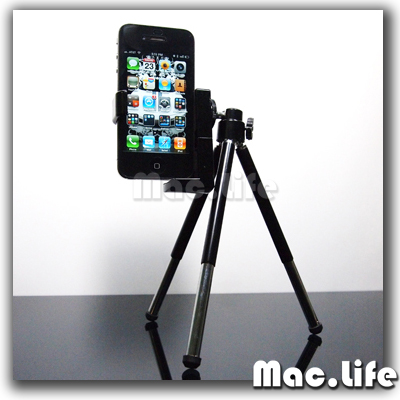
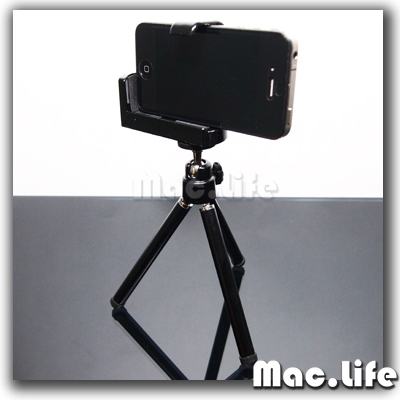
Unboxing BRAND NEW Mini Tripod with Universal Cellphone Holder for iPhone3G/3GS/4 iTouch

Item Details
Camera Type : ALL
Model : ALL
Brand : ALL
Resolution : ALL
Optical Zoom : ALL
Features:

Brand new and high quality
Rotatable tripod stand for cell phone / camera
360 degrees rotation
Lightweigth and portable
Great for taking photos and protecting your mobile phone / iPhone

Features:
1. Suitable for locating different size or thickness of phone with camera;
2. Can be rotated in any angle;
3. With clip arm to secure your cell phone and protect it from shocks;
4. Easy to carry and operate.
Color: black
Weight: 80g
Fit most types of mobile phones and digital cameras
++Package included++
1 X Tripod stand
 

Sunday, 6 November 2011

Cody Simpson - Not Just You (Remix) Video

Hello guys i did a remix for Not Just You by cody i hope you like it !
check out the link below >


Friday, 4 November 2011

Jailbreak Semi-Untethered iOS 5/5.0 iPhone 4/3GS iPod Touch 4G/3G iPad(video)

Top jailbreaks Redsn0w  allow users of iPhone, iPad and iPod Touch to jailbreak devices running of Apple's iOS. However, they only supported Semi-tethered jailbreak.
---------------------------------
Steps:

1. Be sure to have iOS 5 installed on your device. If you haven't yet, here's how you can upgrade.
2. Download Redsn0w 0.9.9b7
for Windows here or Mac here and follow prompted instructions to install.
3. Launch redsn0w on your computer. Turn off the device and plug it in.

5. Go back to the main screen and click "Jailbreak."
6. Click "Install Cydia."
7. Follow instructions prompted by resn0w to put device into DFU mode.
8. Reboot device by connecting device, turning it off and launching redsn0w. Like in step 5, click "Extras" followed by "Just boot."
9. Put device in DFU mode again and redsn0w will boot your device and restore jailbreak capabilities.
========================
Have fun and please follow this blog !

Sunday, 27 March 2011

Acer AS7745-7949 17.3-Inch Laptop

Key Features

  • 17.3-inch CineCrystal LED-backlit widescreen display with 1600 x 900-pixel resolution (native 720p for high-definition viewing). Its widescreen 16:9 aspect ratio is designed to present websites without lots of left-right scrolling, as well as with a smoother line of sight. Specs include a 220-nit high brightness rating, 8ms response time, and 60 percent color gamut.
  • 2.4 GHz Intel Core i3-370M dual-core processor for a fast, responsive PC experience (3 MB L3 cache). It comes equipped with Intel HD Graphics, an advanced video engine that delivers smooth, high-quality HD video playback, and advanced 3D capabilities, providing an ideal graphics solution for everyday computing. Intel's Hyper-Threading Technology enables each core of your processor to work on two tasks at the same time, delivering the performance you need for smart multitasking.
  • 500 GB SATA hard drive (5400 RPM)
  • 4 GB of installed DDR3 RAM (1066 MHz; expandable to 8 GB)
  • Intel HD Graphics (with 128 MB of dedicated system memory) deliver turbo-charged performance and fast throughput and provides support for Microsoft DirectX 10 games.
  • Watch Blu-ray Disc movies in crystal clear resolution with the read-only Blu-ray drive; this notebook also includes an integrated 4x DVD±R/RW SuperMulti drive capable of reading/writing of CD-R/RW, DVD±R, DVD±RW, DVD±R DL, and DVD-RAM.
  • Multi-Gesture Touchpad allows you to pinch, flick and swirl your fingers across the touchpad for more natural photo and video viewing as well as intuitive navigation of websites such as Google Earth. It also enables you to scroll, zoom in and out and flip through web pages, photos, spreadsheets and more.
  • 1.3-megapixel Crystal Eye webcam with a built-in digital microphone that helps keep background noise levels low and minimizes echoes. Acer Video Conference Manager software supports 1280 x 1024 resolution online video calls.
  • Built-in stereo speakers
  • Wireless-N Wi-Fi networking capability provides up to five times the performance and twice the wireless range using 802.11n-compatible routers as you would with 802.11g networks. It's also backward compatible with 802.11b/g networks (commonly found at Wi-Fi hotspots and in older home routers). This laptop uses Acer InviLink Nplify technology that enables multi-stream input or output for faster and more reliable bandwidth, and it also offers Acer SignalUp technology for enhanced antenna efficiency.
  • Gigabit Ethernet (10/100/1000)
  • Multi-in-1 Digital Media Card Reader compatible with Secure Digital (SD), MultiMediaCard (MMC), Memory Stick (MS), Memory Stick PRO (MS PRO), xD-Picture Card (xD)
  • 4 USB 2.0 ports
  • HDMI high-definition audio/video output allows a single cable to transmit uncompressed high-definition video to your digital TV or LCD. It also includes a standard VGA video output.
  • Windows 7 Home Premium makes it easy to create a home network and share all of your favorite photos, videos, and music. And you can watch shows for free when and where you want with Internet TV on Windows Media Center. Get the best entertainment experience with Windows 7 Home Premium.
  • Get more features with Windows Anytime Upgrade. It's the best way to add features to Windows 7, takes as few as ten minutes, requires no software or downloads, and you'll keep your existing programs, files, and settings. Windows will walk you through the simple upgrade process.
  • 6-cell battery (4400 mAh)
  • Weight: 7.1 pounds
  • Warranty: One-year parts and labor limited warranty with concurrent International Traveler's Warranty

What's in the Box

This package contains the Acer Aspire AS7745-7949 notebook PC, rechargeable lithium-ion battery, AC adapter, and operating instructions